

engineLoadTXD
Client-side
Server-side
Shared
This function loads a RenderWare Texture Dictionary (TXD) file into GTA. The texture dictionary can then be used to provide textures.
Note
- Follow loading order ( COL -> TXD -> DFF ) as other orders can cause collisions, textures or the DFF not to load.
- The filteringEnabled property overrides the filtering modes in each texture
of the TXD with point filtering. It also sets the uAddressing and vAddressing
to
WRAP. If textures come with mipmaps then they are disabled which is especially visible without anisotropic filtering. It is recommended to set filteringEnabled to false if the TXD was created with mipmaps (the filtering mode can be changed in a TXD editor).
Tip
Do your TXD files take megabytes of disk space? You can read some tips on reducing the size of TXD files to compress them without ruining texture quality.
OOP Syntax Help! I don't understand this!
- Constructor: EngineTXD (...)
Syntax
txd|false engineLoadTXD ( string filePath/rawData, [ bool filteringEnabled = true ] )Required Arguments
- filePath/rawData: The filepath to the TXD file you want to load or whole data buffer of the TXD file.
Optional Arguments
NOTE: When using optional arguments, you might need to supply all arguments before the one you wish to use.
- filteringEnabled (default: true): Whether to enable texture filtering.
Returns
- txd|false: txd element
Returns a TXD if the file was loaded, false otherwise.
Code Examples
client
local txd = engineLoadTXD("infernus.txd")engineImportTXD(txd, 411)Gallery
Click on the image to view the full preview along with the description.

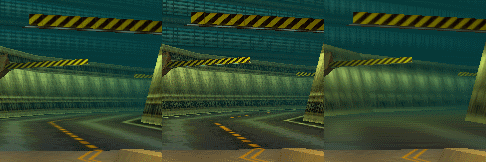
Changelog
Added option to use raw data instead of a file path.
See Also
Engine Functions
- engineAddClothingModelNew
- engineAddClothingTXDNew
- engineAddImageNew
- engineApplyShaderToWorldTexture
- engineFreeModel
- engineFreeTXDNew
- engineGetModelFlagsNew
- engineGetModelIDFromName
- engineGetModelLODDistance
- engineGetModelNameFromID
- engineGetModelPhysicalPropertiesGroup
- engineGetModelTextureNames
- engineGetModelTextures
- engineGetModelTXDIDNew
- engineGetModelVisibleTime
- engineGetObjectGroupPhysicalProperty
- engineGetPoolCapacityNew
- engineGetPoolDefaultCapacityNew
- engineGetPoolUsedCapacityNew
- engineGetSurfaceProperties
- engineGetVisibleTextureNames
- engineImageGetFileNew
- engineImageGetFilesNew
- engineImageGetFilesCountNew
- engineImageLinkDFFNew
- engineImageLinkTXDNew
- engineImportTXD
- engineLoadCOL
- engineLoadDFF
- engineLoadIFP
- engineLoadIMGNew
- engineLoadTXD
- enginePreloadWorldAreaNew
- engineRemoveImageNew
- engineRemoveShaderFromWorldTexture
- engineReplaceAnimation
- engineReplaceCOL
- engineReplaceModel
- engineRequestModel
- engineRequestTXDNew
- engineResetModelFlagsNew
- engineResetModelLODDistance
- engineResetModelTXDIDNew
- engineResetSurfaceProperties
- engineRestoreAnimation
- engineRestoreCOL
- engineRestoreDFFImageNew
- engineRestoreModel
- engineRestoreModelPhysicalPropertiesGroup
- engineRestoreObjectGroupPhysicalProperties
- engineRestoreTXDImageNew
- engineRestreamNew
- engineRestreamModelNew
- engineRestreamWorldUpdated
- engineSetAsynchronousLoading
- engineSetModelFlagNew
- engineSetModelFlagsNew
- engineSetModelLODDistanceUpdated
- engineSetModelPhysicalPropertiesGroupUpdated
- engineSetModelTXDIDNew
- engineSetModelVisibleTime
- engineSetObjectGroupPhysicalProperty
- engineSetPoolCapacityNew
- engineSetSurfaceProperties
- engineStreamingFreeUpMemory
- engineStreamingGetBufferSizeNew
- engineStreamingGetMemorySizeNew
- engineStreamingGetModelLoadStateNew
- engineStreamingGetUsedMemory
- engineStreamingReleaseModelNew
- engineStreamingRequestModelNew
- engineStreamingRestoreBufferSizeNew
- engineStreamingRestoreMemorySizeNew
- engineStreamingSetBufferSizeNew
- engineStreamingSetMemorySizeNew
- engineStreamingSetModelCacheLimitsNew